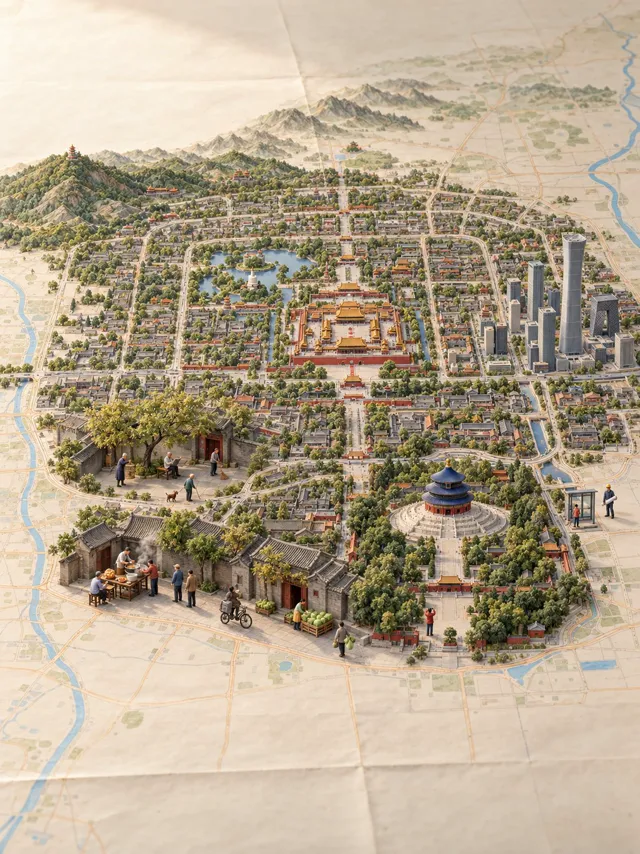
Turn Your City into a Miniature World
Turn a place name into a miniature landscape rising from a paper map, with local landmarks and everyday scenes. Copy the shared prompt into an image-capable AI tool and adapt the city, landmarks, and activities.
Overview
What you get
- The complete prompt.
- A Beijing reference image showing a miniature city emerging from a paper map.
- Instructions for choosing landmarks, arranging everyday scenes, and checking typography.
Good fit
- Creating city-themed posters or travel illustrations.
- Adapting a recognizable miniature style to your hometown or destination.
Not for
- Installing an agent skill package: this post shares a prompt, not an installer.
- Producing a survey-grade map or assuming generated lettering is always accurate.
Tutorial
Understand the miniature city
In the author’s Beijing example above, printed roads connect to raised streets, landmarks such as the Forbidden City and Temple of Heaven establish the city, and nearby courtyards, stalls, and people add everyday life. For your own version, make the location recognizable first, then give viewers small scenes to explore.
This is an image-generation prompt, with no skill package to install. Send the prompt to an AI tool that can generate images and specify a location. The original post does not identify a model. Geographic research, image generation, and separate text layers depend on your chosen tool’s capabilities.
The Chinese prompt is the author’s full reply; the English version is an Opuskill translation. The author also credits @guanmo_ai for inspiration; see the related links. The instructions below are editorial examples and have not been tested by generating images.
Choose your city
- Copy the full prompt and replace “Place: {the user’s place name}” with a specific location, such as “Place: Hangzhou, Zhejiang, China.” A province or country helps distinguish places with the same name.
- Send the edited prompt in an image-generation conversation. It requests a 3:4 portrait image combining local landmarks and three everyday scenes on a paper map.
- Review whether the landmarks belong to the location and whether the city connects naturally to the paper. Then inspect figures, materials, and lettering. Prompt requirements are not a guarantee that the tool will meet them accurately.
The Beijing reference has no cover title, while the full prompt requests a title, coordinates, and a local phrase. To keep the reference’s landscape-only treatment, replace those text requirements before sending: “Keep only essential map labels. Do not add a cover title, coordinates, signature, or local phrase.”
Choose landmarks and everyday scenes
Make it feel like the place you know
A city name leaves landmark selection to the AI. For a particular neighborhood or a project with your own references, append a more specific brief:
Focus on the area around West Lake in Hangzhou, rather than the whole city.
Use the lake and Leifeng Pagoda as the main features, preserving their actual relative positions.
Show people walking beside the lake, cycling, and drinking tea. Use my reference photos to arrange people and objects.
Check the references first. Do not invent buildings or local customs you cannot verify.
Look for activities expressed through specific actions and objects. “Lively local atmosphere” gives less useful direction than explaining what people do and what they use. Supply your own reference photographs and confirm that you have permission to use them.
Adapt it to your purpose
A travel poster can emphasize a destination and visitor experiences; a hometown keepsake can focus on familiar streets and daily routines. Replace the brackets in this brief:
Location: [country, region, city, or clearly defined neighborhood].
Purpose: [travel poster, hometown keepsake, or another use].
Main scenery: [one focal point and one or two supporting landmarks].
Everyday scenes: [three specific activities and associated objects].
References: [photos, maps, or reliable sources I provide].
Text: [exact wording to include, or no cover text].
Keep the miniature landscape naturally connected to its paper map and compose the image around this scope.
Correct lettering and local details
If a building is wrong, edit that region while retaining the successful composition and style. In a tool that supports image editing, attach the current image and send:
Change only the incorrect building on the right. Match its silhouette to the reference photograph.
Keep the paper map, main landmarks, colors, and other everyday scenes.
Connect the replacement naturally to the surrounding streets. Do not add landmarks.
Check every character and verify coordinates independently. If lettering remains wrong, generate the main visual with empty text areas, then add real fonts in a design application. After export, check legibility, cropped edges, and whether the actual pixel dimensions suit the intended use.
Miniature compositions compress distances and may enlarge people for readability. Do not treat them as accurate maps or uniformly scaled models. A publicly shared prompt does not establish unrestricted commercial permission; for client work, check terms for the original image, reference materials, and generation service separately.