AI Reverse Engineering: Decompile, Trace and Rebuild
Analyze shipped software, trace feature implementations and use the evidence to rebuild functionality. REA connects AI agents to static analysis, decompilers and runtime inspection through a local MCP server and CLI.
Works with Claude Code · Codex · Cursor · Gemini CLI · Windsurf · opencode
Requirements
- Node.js ^22.23.4 || ^24.22.1 || >=26.12.1
- npm
Overview
What you get
- A local MCP server and CLI, with matching reverse-engineering workflow instructions installed by guided setup.
- Static JavaScript/Electron analysis without a native engine; native pseudocode and assembly analysis through a configured Hopper, Ghidra, IDA or Kuna installation.
- Evidence-based findings for feature tracing, version comparisons and reconstruction, with runtime investigation available for supported targets.
Tutorial
Understand how a software feature works
You have a shipped application and want to find the modules behind a feature, follow its data flow, or compare two versions. REA lets an AI coding agent call local analysis tools, gather evidence from packages, binaries and runtime behavior, and explain or help reconstruct the implementation.
Decompilation recovers readable pseudocode from compiled programs. Tracing follows calls and data to locate an implementation. Decompiled output is not the original source, and static call relationships do not establish which branch actually ran.
Choose between REA and Replica
- Replica studies public pages, documentation and user flows, then helps build your own application.
- REA inspects shipped packages, binaries or runtime behavior when you need evidence about the actual implementation.
For ordinary architecture questions about a complete source repository, ask your coding agent to read the repository directly.
Observe a clipboard investigation
The official Notion case study follows an Electron clipboard interface from the renderer through a preload bridge and IPC, or inter-process communication, to the main-process handler. It then examines the rich clipboard format.
Look for three things: where the feature starts, which functions carry the data, and what finally writes to the clipboard. A useful result connects those steps and identifies supporting files, functions or other evidence locations.
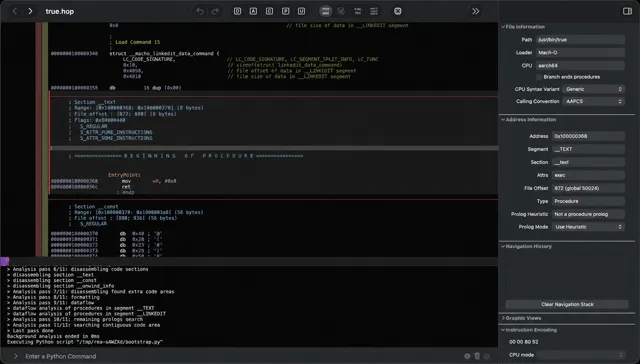
The repository screenshot on this page shows native analysis in Hopper. The first exercise below uses static JavaScript analysis and does not require Hopper.
Connect your coding agent
The npm release checked for this page is REA 6.8.0. It requires npm and Node.js satisfying ^22.23.4 || ^24.22.1 || >=26.12.1. For example, Node.js 22.23.4 or 24.22.1 qualifies; 22.0.0 does not.
- In a terminal, open a trusted working directory outside the target application and run:
npx rea-agents@latest setup- Select Claude Code, Codex or another supported client. Review the configuration paths and proposed changes, then approve them. You can skip Hopper installation for this JavaScript exercise.
- Restart the clients named in the completion message. Guided setup registers the MCP server and installs its matching workflow instructions by default.
- In a new conversation, ask your agent to list its available REA tools and confirm that
analyze_javascript_applicationis present. This checks availability in the actual session.
Running only npx skills add morluto/rea --skill reverse-engineer-anything installs instructions without registering MCP or installing analysis engines. This tutorial follows the full setup route above.
If REA tools are missing, these terminal commands check the Codex configuration and preview a repair plan:
npx rea-agents@latest doctor --client codex --json
npx rea-agents@latest setup --client codex --dry-run --json
doctor checks configuration files and prerequisites, not the live conversation. Review the plan, follow its repair instructions, and restart the affected client. See the setup guide for the client IDs used by other coding agents.
Find the evidence behind one feature
Prepare the application files
Choose an Electron application you can inspect that includes a copy feature. Supply its app.asar file or an extracted JavaScript directory, rather than a desktop shortcut or download URL.
If you only know the installation directory, ask the agent to locate app.asar or extracted code there and show the paths for you to select. This investigation does not need to launch the target. On Linux, the system also needs a working ps command for REA’s checks on processes it starts.
Analyze the copy feature
- Replace the path below with the absolute path to your file or directory and send this request to your connected agent. These practice requests were written for this page.
Use REA to analyze: [absolute path to an ASAR or JavaScript directory].
Goal: explain how this application copies text to the clipboard.
Start with analyze_javascript_application; do not launch the target.
Locate the copy entry point and follow data through preload, IPC and the main-process handler.
Describe the actual structure; do not assume all of those layers exist.
Cite files, functions or evidence locations for each step.
Separate confirmed facts, inference and missing information.
Return the call chain and explanation first, without editing files.- Follow the evidence from the entry point to the final handler. Finding the string
clipboardalone does not establish the full implementation. - If part of the chain is missing, narrow the next request: “Find who registers this IPC channel and show evidence for its handler.”
You can also run static analysis in a terminal and ask your agent to interpret the JSON:
npx -y rea-agents@latest analyze-javascript-application /absolute/path/to/app --jsonReplace the path and quote it if it contains spaces. This command needs neither an MCP connection nor a native decompiler. Read the evidence, module relationships, limitations and unknowns, rather than just the summary.
Rebuild a small feature from the findings
Turn your understanding into one testable implementation before expanding the scope. Continue with:
Use the confirmed call chain to implement “copy text” in my project [absolute project path].
Use the project's current stack. Clicking Copy should write the input field's text to the system clipboard.
Show “Copied” on success and the error reason on failure.
First explain which mechanisms from the reference apply here and propose a minimal implementation.
Keep the analyzed application unchanged. Provide startup and verification steps when finished.
Start your own project using the returned commands. Copy some text, paste it into a text editor, and compare the content. Check empty input and failure feedback too. For an ordinary web project, use its browser clipboard API rather than reproducing Electron’s process communication.
Then make one local change: “Support multiline text and preserve line breaks. Keep the button label and success message unchanged.” Paste again to verify one specific behavior at a time.
Apply the method to your own target
Keep four things explicit when changing targets: input, question, evidence and deliverable.
Target: [local path, program type and version]
Question: [one feature or a specific version difference]
Allowed analysis: [static; describe the scope separately if execution is needed]
Deliverable: [call chain, data flow, pseudocode explanation or comparison table]
Cite evidence locations and list what remains unconfirmed.
Explain the implementation first. Design a reconstruction for my project after we agree on scope.
For native binaries, configure a supported engine such as Hopper, Ghidra, IDA or Kuna for REA to call. Hopper and IDA commercial licenses are not included in REA’s MIT license. Follow the official installation guide for provider setup.
When you need the actual execution path, narrow the question to one action, such as which function receives which arguments after clicking Copy. Ask the agent to select the appropriate runtime tool. Static analysis establishes code relationships; runtime observation adds what happened during execution.