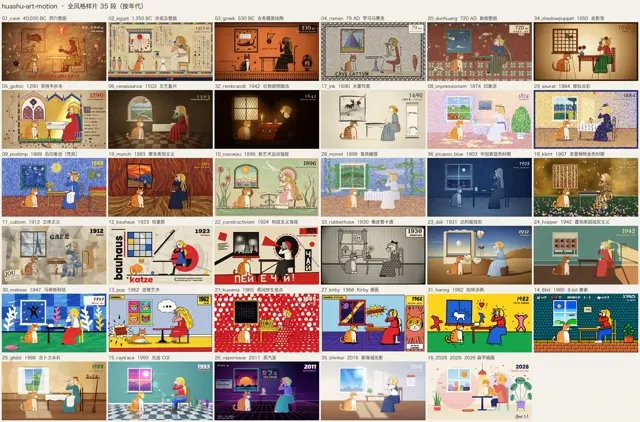
36 Styles for Your Own Art Animation huashu-art-motion
Choose an art style and create your own coded animation, with style recipes, explainer tools and reference projects. Develop the key frame first, then make the scene move.
Works with Claude Code · Codex
Requirements
- uv
- FFmpeg
- Playwright Chromium
Overview
What you get
- 36 art-style recipe cards, with 35 Canvas scenes and a separate SVG example.
- Nine explainer design guides; eight include clips with adjustable parameters and example configurations.
- Reference projects, animation libraries, analysis tools and delivery checks.
Good fit
- Making an original art animation in a chosen visual style.
- Animating objects and brushwork within a scene.
- Producing explainer clips from your own materials and facts.
Not for
- Applying a video filter to an existing clip.
- Assuming every reference project is ready to render without your own assets.
- Reusing the Huashu or Clawd character artwork under the code’s MIT licence.
Tutorial
Turn a visual style into an animation of your own
Van Gogh’s swirling strokes, Monet’s reflected light and spreading ink can become ways of telling a story in motion. This skill organises 36 art styles into recipes and reference code, helping a coding agent develop a scene for your subject and animate what is inside it.
The overview above compares 35 styles using roughly the same girl, cat and room. Keeping the composition consistent makes brushwork, colour and material easier to compare. Your own work should have its own composition. The additional style uses a separate SVG example and is not included in this 35-frame overview.
For this exercise, develop an approximately eight-second impressionist animation of a cup of tea in a garden after rain. Water, leaves and steam should establish a quiet mood. You can later use the same process for your own place, object or brand story.
Install the skill and prepare the renderer
In a terminal, run:
npx skills add alchaincyf/huashu-art-motionChoose your AI coding tool and installation location through the installer. Rendering also requires uv, FFmpeg and Playwright Chromium. To prepare the browser for the first time:
uv run --with playwright playwright install chromiumThe author documents installation checks for Claude Code, Codex and Kimi. Codex passed live execution tests, while account restrictions prevented some live tests for Claude Code and Kimi. Successful installation does not establish that every host, model and media capability has been fully tested.
This tutorial was checked against the README, SKILL.md, style recipes and compatibility notes. We did not install upstream dependencies or generate this exercise. Basic coded animation needs no image or voice service account. Generating characters or sound requires separately chosen tools, materials and permissions.
Give the agent a subject and start with one frame
First decide what viewers should take away. This example is about the quiet after rain, rather than explaining tea production. Impressionist short strokes, soft light and water movement can support that feeling.
Send the following to a coding agent with the skill loaded. These example requests were written for this tutorial, rather than supplied by the creator. We have not used them to generate a video.
Use huashu-art-motion for an approximately eight-second impressionist animation.
Subject: a cup of hot tea on a stone table in a garden after rain.
Mood: quiet after the rain. No people, narration or captions.
Main event: a raindrop lands in shallow water and ripples spread.
Supporting motion: leaves sway slightly and steam rises slowly from the cup.
1920×1080, 30fps. Design a new composition rather than reusing the sample room.
Show the storyboard and a key frame before animating.
Check the frame first. Is the cup immediately visible? Where is the water? Do leaves hide the subject? Does the cup share the painting’s brushwork, or look like an icon pasted onto an oil-painted background? Approve the composition and style before adding camera movement and transitions.
If the composition is uncertain, ask for three alternatives for the same scene: close to the rim, level with the table, or looking down at the cup and water. They should change the viewing emphasis and spatial arrangement, not only the palette.
Make something happen inside the picture
Once the frame works, separate the main event from supporting motion. Here, the raindrop landing is the event, while steam and leaves sustain the scene. The camera can stay still rather than continually zooming in.
Make a first version using the approved composition and style.
Let viewers locate the cup and water before the raindrop and ripples draw attention.
Keep steam and leaves subtle. Avoid random full-frame flicker in the brushwork.
Keep the camera steady instead of repeatedly zooming in.
Show frames from the beginning, middle and end, then a complete short preview.
Still frames reveal composition and style; playback reveals how change feels. If the whole image only scales up while the water and steam stay frozen, the exercise is not yet working. If every stroke flickers, noise can overwhelm the subject instead.
The skill includes checking and delivery tools, but you still need to watch the animation at normal speed. Watch for continuous water movement, steam resetting abruptly and an ending that feels cut off.
Make one local revision
Suppose the ripples work but the steam hides the cup:
Change only the steam: reduce its density and let it drift towards the upper right.
Keep the cup position, water action, palette and total duration.
Use brushwork consistent with the scene rather than adding realistic smoke footage.
Show a revised still and short preview before exporting the whole film again.
This identifies the object, the problem and what should remain. It is easier to act on than “make it more artistic.” Replacing the tea with your product is a larger change: proportions, packaging text and viewing emphasis may need redesigning as well.
Use your own product or explanation
Fill in the following before choosing its visual treatment:
Subject and audience: [who will watch and what they should remember]
Main object: [product, place, object or existing material]
Main change: [what a specific object does and what happens as a result]
Style: [selected recipe or directions to compare]
Materials: [images, logo, text, numbers and paths]
Output: [duration, aspect ratio, sound and captions]
Must remain accurate: [brand facts, colours, product shape]
Confirm a key frame and storyboard before animation. Keep editable source and material credits.
For a product film, use your actual packaging, interface and approved copy. For mechanisms, figures and processes, a whiteboard or chart-based explanation may work better than a painting. The repository has nine explainer design guides; eight include clips with adjustable parameters and example configurations. Some full-film reference projects need your own character and audio assets, so not every project is ready to render immediately.
Start with a single frame when exploring the source
To check the local renderer, clone the repository and run the author’s single-frame example from its root:
git clone https://github.com/alchaincyf/huashu-art-motion.git
cd huashu-art-motion
uv run --with playwright python scripts/engine/render.py --solo 09_postimp --stills 0.3 --out preview
This renders a still at 0.3 seconds in the built-in Van Gogh scene; it does not generate the tea exercise above. For your own project, copy scripts/engine/ into a separate working directory and develop its scenes and sequence. Borrow the rendering methods and motion ideas rather than the sample’s composition and characters.
Code and documentation use MIT licensing. Fonts retain their OFL licences, and some stroke data uses the Arphic Public License. Huashu character art, character frames and demos containing that likeness are excluded from MIT reuse. Clawd belongs to Anthropic, and its fan demos are also excluded. Use your own characters and materials to apply the production methods to your work.