Make a Promo That Explains Your Product video-shotcraft
Turn product features into a clear promo video using screenshots, copy and branding. Choose from 150 motion shots and keep the editable Remotion project alongside your MP4.
Works with Claude Code · Codex
Requirements
- Node.js / npm
- FFmpeg / FFprobe
Overview
What you get
- 150 motion shots across 124 recipe cards, with source implementations.
- A product promo MP4 and editable Remotion project.
- A browser-based Motion Workbench, with optional JianYing draft export.
Good fit
- Explaining a product feature through a clear sequence of shots.
- Adapting motion recipes to your screenshots, copy and branding.
- Revising a delivered promo through source or the browser workbench.
Not for
- Treating every shot effect as a finished product story.
- Publishing the template’s demonstration screenshots as your own product.
- Assuming audio assets and Remotion use the repository’s Apache-2.0 licence.
Tutorial
Explain a feature rather than only showing motion
A promo does not need to show every feature. Start with a problem viewers recognise, then show how the product changes the situation. That gives motion a purpose beyond attractive transitions.
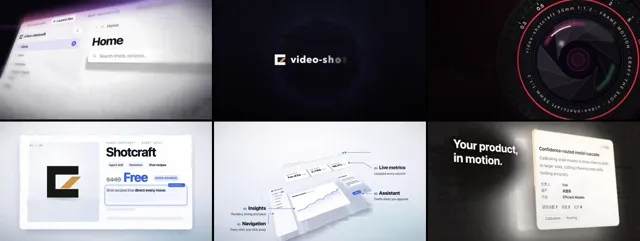
video-shotcraft provides 124 recipe cards covering 150 shots, with editable implementations. The image above is a frame from the official six-shot overview. Browse moving examples in the Gallery. Page layers, card entrances and animated typography are tools for developing your own product story.
This exercise uses a fictional article-saving app: finding one useful article among a cluttered collection. You will prepare materials, choose how to collaborate and build a sequence that connects each action with its result.
Install and choose one feature to explain
In a terminal, run:
npx skills add Vincentwei1021/video-shotcraftUse the installed skill in Claude Code or Codex. Production needs Node.js, npm and FFmpeg/FFprobe. Page capture uses Puppeteer; music beat analysis also needs uv. Remotion prepares its own headless browser on first render, so the environment must allow that download and execution.
Prepare the product URL or project path, logo, brand colours, feature description and page states that can be shown. This example needs collection, search-result and article-detail states. A homepage screenshot alone does not tell the agent what happens after searching or filtering.
This tutorial was checked against the README, SKILL.md and template guide. We did not install upstream dependencies or generate this example. These example requests were written for this tutorial. We have not used them to generate a video.
Choose your level of involvement
The skill offers three production modes:
| Mode | When it fits |
|---|---|
| Ink Press template | You want the existing paper-and-ink treatment and shot structure, adapted to your materials. |
| Autonomous creation | You have a clear goal and want the agent to handle the visual design and production from start to finish. |
| Guided creation | You want to approve the product focus, visual direction, shot mapping and full storyboard. |
Choose guided creation for this exercise so you can see how a feature becomes a sequence. Send:
Use video-shotcraft to make a promo for my article-saving app.
Product: [URL or project path]. Use guided creation.
Audience: people who save many articles but struggle to find them later.
Main benefit: search and filter the collection to find the article they need.
Materials: [logo, brand information and page-state paths].
Inspect the product and propose a brief and visual direction before production.
Do not try to include every feature.
Once you have chosen a mode, you can move on to planning the film. Naming a shot constrains one effect; it does not decide the creative direction of an entire promo.
Ask what each shot explains
Browse the Gallery and copy shot names to the agent. For example, type-and-filter can show results narrowing after a query, while row-embed can guide attention through detail-page information. They serve this exercise because viewers can connect an action with a result.
Instead of asking for a collection of impressive effects, request a feature-to-shot mapping and then a full storyboard:
Build the sequence around: many saved articles → enter a query → filter results → open the target article.
Use type-and-filter as a reference for search and consider row-embed for details.
Explain what viewers learn in each shot, then specify order, duration, page states, captions and sound.
Keep my brand colours and only the text needed to understand the feature.
Does the result actually change after the query? Does the selected article remain identifiable in the next shot? An input box flying in and cards flipping may still fail to explain the benefit.
In guided creation, approve the proposed shots first, then review the complete storyboard. A list of shot names without timing, page states and viewing order is not yet a film plan.
Check key moments, then play the whole film
After storyboard approval, the agent captures final materials, adjusts screenshot placement and cropping, builds Remotion scenes and adds sound. Default delivery is a 1920×1080, 30fps MP4. Request other aspect ratios early so the composition can be redesigned.
Make a first version from the approved storyboard.
Check the moments before search, after filtering and after opening the article.
Keep article names and page states consistent.
Check transitions, then play the whole film for readable text, clear feature explanation and sound timing.
Keep the Remotion project and editable workbench data.
Still frames help with text and layout; playback reveals pacing. Check whether results remain recognisable after a camera move. A tiny interface and a long caption demand too much simultaneous reading.
Ink Press is a separate template route. Its existing film is about 36.2 seconds and uses sound effects without background music. Those are template properties, not fixed requirements for every new promo. Changing products still requires adapting screenshots and copy shot by shot, beyond the opening logo.
Make a local change without breaking the sequence
If the result page disappears too soon:
Leave more reading time after the search results appear.
Let viewers locate the target article before moving into its detail page.
Keep the approved shot order, colours and opening.
Adjust the transition and sound cues, and check the effect on later shots.
Show these two shots before rebuilding the full film.
After delivery, Motion Workbench supports editing copy, colours, shot positions and timing before exporting through Remotion. Optional JianYing draft export offers another editing route. The author verified JianYing Pro 11.2 on macOS, rather than every version and platform.
Adapt it to your product
Fill in the following with your own product details:
Product and audience: [name and intended users]
Problem: [one concrete difficulty]
Visible change: [before → key action → after]
Materials: [URL, project, page states, logo and copy paths]
Mode: [template, autonomous creation or guided creation]
Shot references: [Gallery names, optional]
Output: [aspect ratio, duration, language and sound]
Must remain accurate: [capabilities, numbers, names and branding]
Deliver the MP4, editable project and material credits. Do not automatically publish to social platforms.
A calendar tool might move from a scheduling conflict to an available slot. A data tool could show how a user investigates an unexpected figure. Define that change first, then choose shots that explain it.
Code and documentation use Apache-2.0. Audio files retain their individual licences, and Remotion has its own licence. Replace demonstration screenshots with product materials you have permission to use before publishing your own work.