Easel: Plan, Create, and Publish Social Content Easel
Plan and create social posts that fit your audience and account’s focus. Easel brings writing, image cards, video workflows, publishing, and review into a local workbench that requires model API configuration.
Requirements
- Python >=3.10 + venv
- Git
- Node.js 24.16+ (24.x) / 26.1+ (26.x) / 27+
- FFmpeg
- Playwright / Chromium
- LLM API
Overview
What you get
- An account profile that remembers your focus, audience, and style.
- Editable copy and image cards, plus videos made with your configured services.
- Organized assets and outputs, with workflows for platform adaptation, publishing, and review.
Good fit
- Publishing regularly with a consistent style and reusable materials.
- Adapting one topic into image cards and a short video.
- Managing drafts, outputs, and publishing plans in one workbench.
Not for
- Expecting the full application to work just by adding a prompt.
- Using every image, voice, and video capability without configuring model services.
- Assuming a generated or exported file has already been published.
Tutorial
Create image-card posts and short videos with Easel
Knowing what to share is only the start. You still need a title, copy, visuals, possibly a video, and versions suited to different platforms. Easel brings those tasks into a local workbench and remembers your account’s focus, audience, and style for future posts.
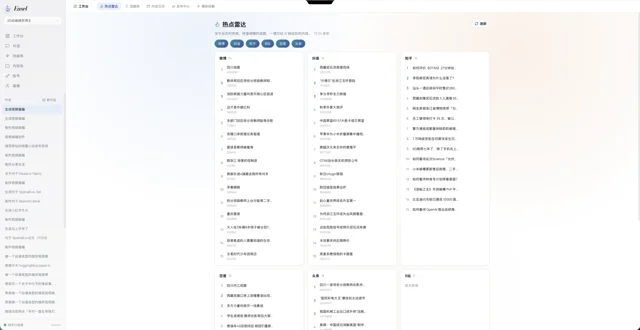
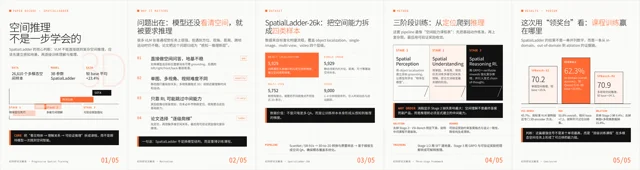
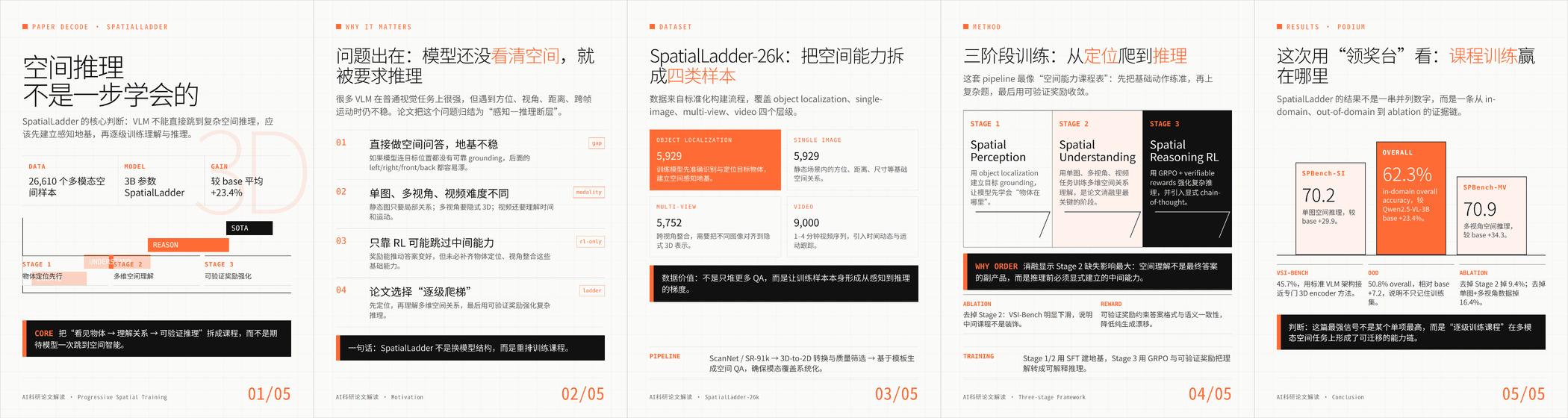
The gallery above shows the official trend-discovery interface, SpatialLadder paper-explainer cards, and the first 60 seconds of the related video. The cards spread the explanation across several images; the video pairs visuals with narration. These are creator-provided examples of two ways to present a subject, rather than a guarantee of equivalent results for any input. A link to the full video appears among the sources below.
To read the smaller text, open the official full-resolution card image and zoom in. Look at the hierarchy between a card’s heading and body, then compare how adjacent cards connect. Use these details to plan the content and layout of your own cards.
For this exercise, explain how to turn meeting notes into actionable tasks. Make an image-card post first, then adapt the same idea into a short video. The example requests were written for this tutorial; we have not run them in Easel to generate finished content. Installation and workflow details were checked against the official README and relevant SKILL.md files.
Prepare the workbench
Check the requirements
Easel supports Linux, macOS, and Windows 10/11. Install Git first so you can run the clone command below. Other dependencies are handled by platform:
| Platform | Before running the installer | Handled by the installer |
|---|---|---|
| Linux / macOS | Python 3.10+ and venv | Checks Node.js and attempts installation if needed; attempts to install missing FFmpeg; installs project dependencies and Playwright/Chromium |
| Windows | PowerShell; winget must be available to install missing dependencies automatically | Uses winget to install missing Python, Node.js, and FFmpeg, then installs project dependencies and Playwright/Chromium |
Supported Node.js versions are 24.16+ within 24.x, 26.1+ within 26.x, or 27+. Avoid 25.x and 26.0. Automatic installation depends on system tools and permissions; follow the installer’s instructions if it fails. FFmpeg handles audio/video processing, while Playwright/Chromium supports browser login and publishing. Missing components leave those features unavailable.
Install and start Easel
Choose the commands for your operating system.
Linux / macOS
Run in a terminal:
git clone https://github.com/ZJU-REAL/Easel.git
cd Easel
bash setup.sh
source .venv/bin/activate
easel doctor
easel webWindows
Run in PowerShell:
git clone https://github.com/ZJU-REAL/Easel.git
cd Easel
Set-ExecutionPolicy -Scope Process Bypass
.\setup.ps1
.\.venv\Scripts\easel.exe doctor
.\.venv\Scripts\easel.exe web
Easel uses OpenClaw to run its AI agent by default. The installer checks for or installs OpenClaw and creates a separate profile named easel, preserving your existing configuration.
Windows compatibility across skills and browser publishing is still being improved. A successful installation does not mean every feature has been verified.
Configure model services
- Open
http://localhost:7860and follow the first-launch prompt to model settings. - Enter your model API key, starting with the model needed for chat.
- Run the connection test in settings and confirm that the model connects before continuing.
Configure image, video, music, or cloud voice services when you need them. Local card rendering does not require a separate image-generation API. Model and media services may charge separately.
Check the workbench connection
easel doctor checks the environment and configuration. After configuring your model, open another terminal in the Easel directory to check that the agent can communicate with the OpenClaw gateway, its local background service.
On Linux/macOS, activate the project environment in each new terminal:
source .venv/bin/activate
easel ping
In Windows PowerShell, use the project executable directly, without activating the environment:
.\.venv\Scripts\easel.exe pingIn the default OpenClaw mode, both checks should show OK, followed by ✓ 全部通过 (all checks passed). This confirms connectivity for this test, not that every image-card or video feature works. The connection test in model settings only checks the model service and does not replace this check.
If the connection fails, review the results from doctor and the model settings connection test. For a remote server, forward port 7860 and open the forwarded address in your browser.
Make your first image-card post
Create an account profile
An explanation for a first-time team lead needs different language and detail from one aimed at an experienced project manager. Create an account profile before making your first post. Send this in the workbench chat:
Create an account profile named “Practical Work Notes”.
Audience: new project leads who sometimes miss meeting follow-ups.
Focus: practical methods I have personally used to organize work.
Voice: direct and specific; explain through small examples without exaggerated promises.
Platform: Xiaohongshu image-card posts first, with vertical short videos later.
Visual preferences: light backgrounds, readable text, one idea per card.
Do not invent my work history, customer examples, or productivity statistics.
Ask me for missing information and show a profile summary for approval first.
The profile stores your account’s focus, style, audience, target platforms, preferences, and long-term memory. You can supply this information directly without an existing social account to analyze. If a profile link cannot be read, provide your own information rather than asking Easel to guess your account’s performance.
Prepare your materials
Prepare a short set of meeting notes with personal and company details removed, followed by the task list you would actually make from them. Save the text as meeting-notes.md. If you have a screenshot of your own task list, save it as task-list.png. These are suggested input filenames for the exercise; you need to prepare the files yourself.
| Material | What to include | Purpose |
|---|---|---|
| Meeting notes | Decisions made and questions still unresolved | Give the explanation a concrete example |
| Your organized task list | Action, owner, and due date; mark missing details for confirmation | Show the change from notes to tasks |
| Your own screenshot (optional) | A relevant interface you can share publicly | Make the result easier to recognize |
Submit a request and approve the structure
Use the profile you just created, attach your materials to the workbench conversation, and send:
Use my meeting notes and task-list example to make a Xiaohongshu image-card post.
Topic: turning meeting notes into actionable follow-ups.
After reading it, people should be able to check whether a task states the action, owner, and due date.

Propose the central point, a draft, and a plan for five 3:4 cards:
1. Cover: the reader's problem.
2. An example of a vague meeting note.
3. The same note rewritten as an actionable task.
4. How to confirm information that is still missing.
5. A short reminder readers can apply to their own tasks.

Use one main point per card and follow the Xiaohongshu skill's text limits.
Keep the light backgrounds specified in the profile. Use my screenshot if supplied; do not invent an interface.
Show the draft and structure first. Wait for approval before rendering cards and producing title options, a caption, and hashtags.
Keep editable files and provide previews with their actual saved locations. Do not publish.
Before approving card production, review the draft in this order:
- Check the example against your source notes. Remove any owner or deadline you have not confirmed.
- Check the structure. Each card should develop the same central idea rather than simply republishing the meeting notes in a new layout.
Review the cards and find the saved files
Easel’s xhs-note-creator coordinates the post; card production uses card-xiaohongshu and card-design. Once the cards are rendered:
- Check that small text is readable and screenshots retain important details.
- Check that the title, caption, and hashtags agree with the post.
- Open the outputs and intermediate files at the location returned by the workbench, under the project’s
outputs/directory.
Revise one card
If the third card feels crowded, request a focused change:
Card three explains three different issues and feels crowded.
Keep the existing example and the set's visual style. On this card, show only the vague note and the actionable task.
Move the supporting explanation into the caption. Preview the revised third card first, and show any caption changes too.
This tells Easel what is wrong, what to change, and what to preserve, making the next version easier to assess.
Adapt the topic into a short video
People control their own reading speed in an image-card post. A video must coordinate narration, visuals, and subtitles within a fixed duration. Replan the explanation instead of asking Easel to play the five cards in sequence.
Approve the narration, shot plan, and voiceover service
Continue in the same conversation:
Adapt the approved content into a 30-second, 9:16 vertical video with English narration.
Use the same meeting notes, organized task list, and my screenshot.
Structure: the problem → a vague note → an actionable task → a reminder to confirm missing information.
Show the narration and shot plan first. Identify the materials and any additional services you would call.
Confirm an available English voiceover method and its configuration. If voiceover is not ready, save the script and storyboard, explain what is missing, and wait until it is configured before assembly.
Wait for approval before producing voiceover, subtitles, and the assembled video. Do not publish.
Keep screenshots and cards containing text static, without panning or cropping. Do not add unverified statistics.
When approving the shot plan, also check the configuration and costs for voiceover. Using screenshots and cards avoids the need for a video-generation service, but voiceover still needs to be set up separately.
Choosing a video workflow: Use auto-short-video to create a short video from a topic. It coordinates the script, visuals, voiceover, subtitles, and assembly. Generating moving video clips requires an appropriate video service; a video assembled from your screenshots and cards does not need generated video clips.
video-production edits existing footage, such as a talking-head recording. It requires a source video rather than a topic alone. Stories with characters, dialogue, and episodes also have a separate workflow.
Check the assembled video
After approving the shot plan and voiceover configuration, ask Easel to produce voiceover, subtitles, and the assembled video. In the preview, listen to the narration, then check that each visual appears alongside the relevant sentence. Making a sentence longer can require new voiceover, longer shots, and revised visual timing as well as subtitle changes. Ask Easel to retain intermediate files such as the storyboard, audio, and subtitles so you can replace individual parts later. Follow the deliverables reported for your actual task.
Export your work and publish when ready
This exercise ends with a preview and exported files. You do not need to connect a social account first.
- Choose manual review and publishing in the publishing center. Adapt the content for your platform and review the preview.
- Copy or export the content and keep the editable files.
- If you decide to publish, check and submit the content in the platform’s own editor.
Manual review is the tutorial’s recommendation; Easel’s default entry remains automated publishing.
Copying, exporting, and saving a schedule do not mean a post has been published. Changes to the title, platform copy, hashtags, or selected media require another review.
Optional: disable automatic submission in the Web backend. Set this in Easel’s .env:
EASEL_PUBLISH_MODE=manualChoosing the manual path does not disable every publishing capability elsewhere in the application or its CLI. See the official manual publishing guide for the configuration’s scope.
After publication, record the post URL, reader questions, and performance data you can actually obtain. Bring those observations back into Easel and explain what worked and what needs revision. Leave unavailable data blank so the next plan follows evidence rather than an invented performance report.
Use your own topic for the next post
Replace the bracketed information and send this in the Easel workbench:
My account serves [audience]. After viewing this content, they should be able to [specific outcome].
Topic and central point: [your idea].
Available materials: [files, your experience, verifiable sources].
Format: [card count and aspect ratio, or video duration and aspect ratio].
Voice and visuals: [qualities to retain].
Do not use: [unsuitable wording, materials, or unconfirmed information].
Propose the structure, missing inputs, and services needed first.
After approval, produce the content, keep editable files, and provide previews with their actual saved locations.
Create the content, but do not publish it.
The Easel repository uses Apache-2.0. Separately check service fees and terms, along with permissions for your images, music, people, and product materials. Official examples demonstrate production approaches; they are not a stock-media pack to rename and publish as your own.