Give AI-Built Pages a Distinctive Design
Build a page around your content and the action visitors came to take, with less of the usual AI template look. Hallmark combines 48 visual themes, a hero-first workflow, browser checks and reviews, with separate modes for auditing and redesigning existing pages.
Works with Claude Code · Codex · Cursor · opencode
Requirements
- Node.js >= 22.20 (skills CLI)
Overview
What you get
- A page designed around its purpose, using one of 48 themes or a custom visual direction.
- A staged build that reviews the hero before completing the page, followed by static checks, browser checks and a visual review.
- Audit and redesign workflows for existing pages, with records to compare content, links and forms before and after a redesign.
Good fit
- Building a website or new page from your own content, photographs and product screenshots.
- Checking an existing page or changing its appearance while preserving its content and behavior.
Tutorial
Understand the result and when to use it
An AI-built page can work and still look familiar: a large headline, a row of cards and the usual gradient. Hallmark is a design skill made by Together AI. It uses visual themes for typography, color and surfaces, arranges content around the page’s purpose, then checks the rendered page and its controls.
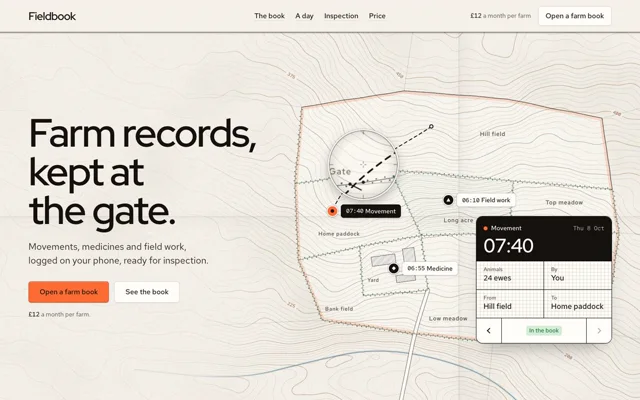
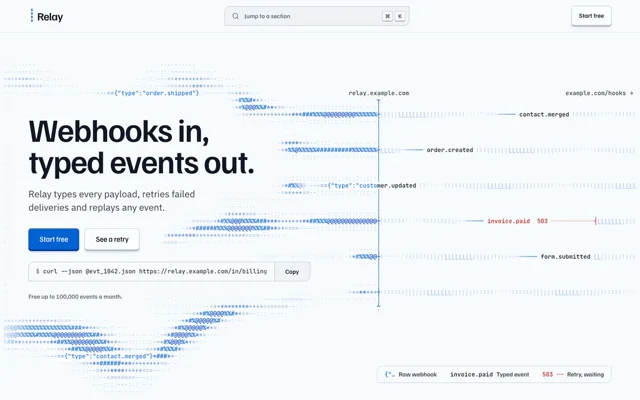
The official Furrow and Cobalt examples appear above. Furrow explains a farm-records product with a map and records; Cobalt presents a developer tool through an event stream. Compare their focal points, information structure and primary actions. The themes change more than the colors. Open the official gallery to explore complete pages.
Choosing between design skills
- Hallmark suits building web pages and auditing or redesigning existing ones. It combines visual direction, a hero-first build and browser checks.
- huashu-design suits comparing design options or making presentations, infographics and app prototypes. It explores six candidates and presents three drafts for you to choose from.
- landing-page-design suits landing pages focused on one primary action, with an emphasis on the offer, copy and section-by-section construction.
Install and prepare the project
This exercise uses Claude Code to build a signup page for an independent bookshop event. The current installer requires Node.js 22.20 or later; Hallmark’s own scripts require Node.js 18 or later.
- Run this command in a terminal to install the complete skill globally:
npx skills@latest add nutlope/hallmark -g --agent claude-code- Browser checks also need Chrome or Chromium installed locally, plus the Puppeteer connection library:
npm i -g puppeteer-core- Start a new conversation and confirm that Claude Code can find
/hallmark. Its directory,~/.claude/skills/hallmark/, should containSKILL.md,references/andscripts/.
For Codex CLI, use the Codex command in Quick start. Invoke the skill with $hallmark; its global directory is ~/.agents/skills/hallmark/. You can also explicitly name Hallmark in the requests below.
Turn your requirements into a brief
- Create a project folder. Put the event name, date, time, location, description and real signup URL in
brief.md. - Add bookshop or event photographs you have permission to use to
assets/. Open this project folder in your coding agent. - Send this tutorial exercise to the agent:
Use Hallmark to build a signup page for an independent bookshop event. Output index.html and the supporting stylesheets.
Read the event details and signup URL from brief.md. Use the photographs in assets/.
Audience: local readers. Main action: open the signup link I supplied.
Visual direction: warm, restrained editorial design with a bookish character.
Explain your theme choice, hero composition and primary button placement. Build only the hero for me to review.
Wait for my approval before completing the page and running the checks.
Hallmark first reads the project and its material. The standard theme workflow recommends three candidates from 48 themes. The agent looks at their reference images, selects one and explains why. These are theme directions; the page layout still follows the needs of this event.
If you already have a specific visual concept, ask for custom to design from your brief. An existing design.md carries a project’s established design system.
Approve the hero, then complete the page
- Open the hero preview using the path the agent supplies. Check what the event is, when it takes place and where to sign up. Look for photographs obscuring text.
- Give one concrete correction at a time, such as “Keep the photograph and palette, but move the date closer to the signup button.” Once the direction works, continue:
The hero direction is approved. Keep the current theme, typography and primary button style. Finish the page.
Use the actual content in brief.md for the event introduction, time, location and signup links.
Point every signup button to the same real URL. Complete the mobile layout and keyboard focus styles.
Run Hallmark's static and browser checks, fix the findings, then complete the visual review.
Give me the preview path and check results.- Read the complete page and try the signup buttons. Use Tab to move keyboard focus, then narrow the window to check readability. Keep the page centered on helping visitors understand the event and reach the signup destination.
Hallmark separates its checks into three tiers. Floor findings must be fixed. Reflex findings identify common design habits and can be retained with a reason. Finish findings are craft details to assess. Resolve the Floor first, then judge the remaining suggestions against the page’s purpose.
Check the page and make a small revision
For this static-page exercise, rerun the browser checks from a terminal at the project root:
node ~/.claude/skills/hallmark/scripts/sloplint.mjs ./index.html --renderRead the FAIL and REFLEX findings and the browser execution status. Without a browser or Puppeteer, the script still performs static checks but reports that rendering did not run. Add the missing tools and rerun it. In a framework project, start the development server first and have the agent pass the actual page route with --url.
Save the current version before trying a small change. Ask: “Use Hallmark to polish this page. Keep the layout and existing visual style. Only improve body-text contrast and make button focus styles consistent.” Compare screenshots, then try the signup links again to judge whether the change solved the problem.
For an existing page, choose the depth first
In Claude Code, choose the request that matches your goal:
| Goal | Request to send the agent | Result |
|---|---|---|
| Inspect the page | /hallmark audit ./index.html | A report without edits to project files |
| Keep the layout, change the look | /hallmark redesign ./index.html keep the layout | Changes to the visual system, including type and color |
| Rework structure and appearance | /hallmark redesign ./index.html | A new composition that preserves the content and existing interactions |
Start a redesign with a clean working tree and the local source files available. Hallmark uses --before to record links, forms and related behavior, then --kept to compare the result. It also produces .hallmark/compare.html. Inspect the before-and-after views and try the original actions yourself.
Adapt it to your own project
After the bookshop page, try an exhibition, workshop or product page. Replace the brackets in this brief and send it to the same agent:
Use Hallmark to make a [page type] for [project name].
Audience and main action: [who visits and what they should do].
Real content and material: [documents, photographs, product URL or screenshot paths].
Existing design system: [design.md path or brand rules to retain].
Visual direction: [named theme, desired character, or custom].
First deliver: [the hero or one named page]. Wait for my approval before continuing.
After completion: [main actions and page routes to check].
For a new subject, revise the content order and primary action before changing the look. For a multi-page site, ask to “lock the system” and save the agreed rules in design.md. Later pages can use consistent typography, colors and component styles. If you use the skill’s photo library, retain each photograph’s author credit and license.