Give AI-Built Interfaces Their Own Character
Refine an AI-built interface around the product’s purpose. unslop audits the existing screen, confirms a design direction, then works through nine passes covering spacing, color, copy, layout and more.
Works with Claude Code
Overview
What you get
- An audit and a product-specific direction to approve before editing.
- Nine ordered refinement passes, plus focused polishing when only a few issues remain.
- Two example pages, visual references and optional scripts for saving a live page or rendering a transformation video.
Good fit
- Refining an existing dashboard, app screen or landing page while preserving its purpose.
- Explaining design changes through an optional short before-and-after story.
Tutorial
See how an interface develops its own character
Use unslop when the features are already there, but the interface is full of gradients, glows, emoji icons and inconsistent spacing. It audits the existing screen, derives a direction from the product and audience, then refines spacing, color, icons, copy, type, layout, details, visuals and motion.
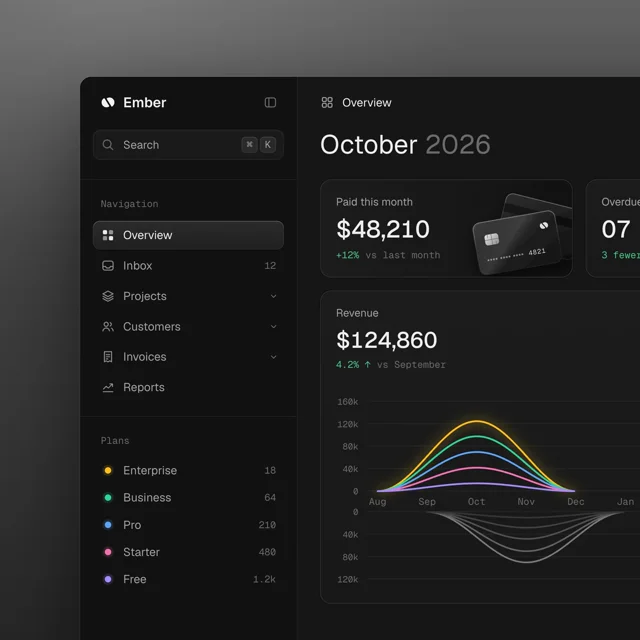
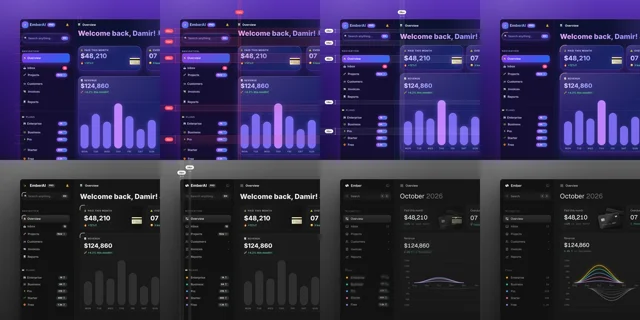
In the official finance dashboard example, navigation and surfaces become quiet dark neutrals. Payment cards and the revenue chart carry the color. The story frames also show spacing measurements, icon replacements and revised headings. The lesson is to give product content the attention, rather than make every interface dark.
Choose between web design approaches
- Give AI-Built Pages a Distinctive Design offers 48 themes, a hero-first workflow for new pages, and audit and redesign modes. unslop concentrates on refining an existing screen layer by layer.
- Build Cinematic Heroes with Video and 3D Assets starts with assets and design specifications for a hero. unslop fixes the foundations of an existing interface before deciding whether it needs a new visual.
Install the skill and open a practice page
Install the complete skill in Claude Code
- Open a terminal where you keep practice projects and run the official installation commands:
git clone https://github.com/heydamir/unslop
mkdir -p ~/.claude/skills
cp -r unslop/skills/unslop ~/.claude/skills/Copy the entire skills/unslop directory, including SKILL.md, references/ and scripts/. For one project only, copy it into that project’s .claude/skills/ instead. The checks and script commands below use the global installation path. For a project installation, replace ~/.claude/skills/unslop/ with .claude/skills/unslop/ and run them from that project’s root.
- Enter the cloned repository, make a working copy of the bundled dashboard, and start Claude Code there:
cd unslop
cp examples/dashboard.html dashboard-practice.html
claude- Send the following practice request in Claude Code. These exercises were written by Opuskill and use the repository’s example as input.
/unslop dashboard-practice.html
This is a finance dashboard exercise for small teams checking payments and revenue trends each day
Open the page, list the issues with their locations, then propose a direction
Keep the existing features and section order; do not invent statistics or product capabilities
Show me the audit and direction before editing, and wait for approval
Claude should return an audit and direction before rewriting the file. If /unslop is not recognized, check that ~/.claude/skills/unslop/SKILL.md exists, then retry in a new session.
Derive a direction from the product
unslop defines its direction in five parts. Review whether these choices fit the product, rather than simply choosing a favorite color.
| Part | What to confirm |
|---|---|
| Product | Who it serves and what task it helps them complete |
| Character | Two or three concrete qualities, such as calm, precise and slightly warm |
| World | Materials and associations drawn from the business, such as financial records, ledgers or instruments |
| Moments | One or two places that deserve emphasis, such as revenue trends and payment cards |
| Signature | One small detail that consistently expresses the product’s character |
For a screen with only a few issues, the skill makes focused refinements using its existing brand, palette and layout. For an already well-designed screen, it suggests only a few small changes and waits for agreement.
- Read the audit and check that the listed issues appear on the page.
- Correct any direction that misrepresents the product. If revenue trends matter more than payment cards, say so.
- If you want a transformation video, ask Claude to save the original state and each pass before approving the redesign.
- Approve the direction before asking Claude to start the nine passes.
For example:
Use a calm, precise direction that is easy to scan
Make revenue trends the primary visual focus and payment cards secondary
Keep the existing product name and data, and establish a clear hierarchy between navigation and content
Continue with the nine passes in this direction
You are agreeing on the reasons behind the design. With another product, start again with what its users need to see before choosing color, type and details.
Review the passes and make one local revision
The nine passes are spacing → color → icons → copy → type → layout → details → visuals → motion. Resolving spacing and wording first gives typography and layout a firmer basis.
- Inspect the complete revised page. Check that the original problems are resolved: navigation rows align, text is readable and the main chart stands out.
- Check key buttons, links and existing interactions at desktop and phone sizes.
- Pick one area to revise instead of asking for an undefined improvement:
Revise only the left navigation
Give sibling items consistent row heights and icon boxes, with smaller gaps within groups than between groups
Keep the approved colors, type, chart and main content layout
Show before-and-after navigation screenshots and explain which dimensions changed
Name the area, desired result and choices to preserve so you can judge the revision. When a new visual needs image generation, the skill shows its image prompt first and asks before paid generation.
Use your own page
With source code, provide the component, page path or running URL in your project. With only a screenshot, the skill first rebuilds a static page. With only a URL, it saves the page and redesigns a local copy, delivering code for later integration. If the original page uses script-drawn animation, give Claude screenshots from the live page, identify the effects you want to preserve, and check each effect in the local copy.
Replace the bracketed fields and send this in Claude Code:
/unslop [page file or URL]
Product: [what it does and who it serves]
Main task on this page: [one action the user needs to complete]
Must preserve: [features, section order, real data and brand assets]
Most visible problem: [one concrete observation]
Audit the page and propose a direction, then wait for my approval before editing
Optionally make a transformation video
If you want a shareable story, request it before the redesign starts. Claude can then record the passes as it works and assemble unslop-story/story.html. This file keeps the original styling and three to five groups of changes on one page, animating CSS values with spacing measurements or corner annotations.
- Ask Claude to build the story file for the practice page:
Make a story video for this redesign
Use the original screen as step 0 and combine the changes into three to five groups
Emphasize spacing, color and icons, then copy and details
Create unslop-story/story.html, show me a preview, then export after approval- This feature needs Node.js, Playwright, a working Chromium browser and FFmpeg. Ask Claude to check them. If Playwright is missing, install the package and browser in the project terminal:
npm install -D playwright
npx playwright install chromium
Install FFmpeg through the appropriate method for your system. Back in Claude, have it finish the story file before running the renderer; the original static example alone does not contain the transformation steps.
- From the project root containing
unslop-story/, preview the story. Close the browser window before exporting:
node ~/.claude/skills/unslop/scripts/story.mjs unslop-story/story.html --play
node ~/.claude/skills/unslop/scripts/story.mjs unslop-story/story.html unslop-story.mp4
The default is square; add --wide for 16:9. The current script renders at 60fps and outputs 2160×2160 or 3840×2160. Duration depends on the steps. The video presents the transformation; the finished page is delivered as normal project code.
- Watch the export for continuous changes, readable emphasis on a phone and a clear final state. The script includes an
unslop by @heydamircredit. When copying or adapting the skill, credit Damir Sokolovsky and link to the repository, as required by CC BY 4.0.