Make AI Designs Look Less Alike
Compare three visual directions before building a website, slide deck or clickable app prototype. huashu-design 3.0 uses visual references, 84 style samples and a local design history to help projects look distinct.
Works with Claude Code · Codex · Cursor
Requirements
- Node.js >= 22.20 (skills CLI)
Overview
What you get
- Three distinct design drafts selected from six visual candidates, with reference screenshots for comparison.
- HTML websites, clickable app prototypes, slide decks with editable PPTX export, or infographics, depending on the task.
- A local record of design preferences and recent visual choices, plus checks for issues such as broken images and low contrast.
Good fit
- Comparing visual directions when you can describe the goal but cannot name the style.
- Designing a prototype or presentation with your own brand assets, content and reference images.
Not for
- Shipping a production app with accounts, databases, recognition services or other backend integrations.
Tutorial
Understand the birdwatching example and when to use the skill
When a design feels wrong, it can be hard to explain what to change. Use this birdwatching prototype exercise to compare directions with huashu-design, then refine your choice.
Version 3.0 explores six candidates, then selects three design drafts. It uses real references and 84 style samples.
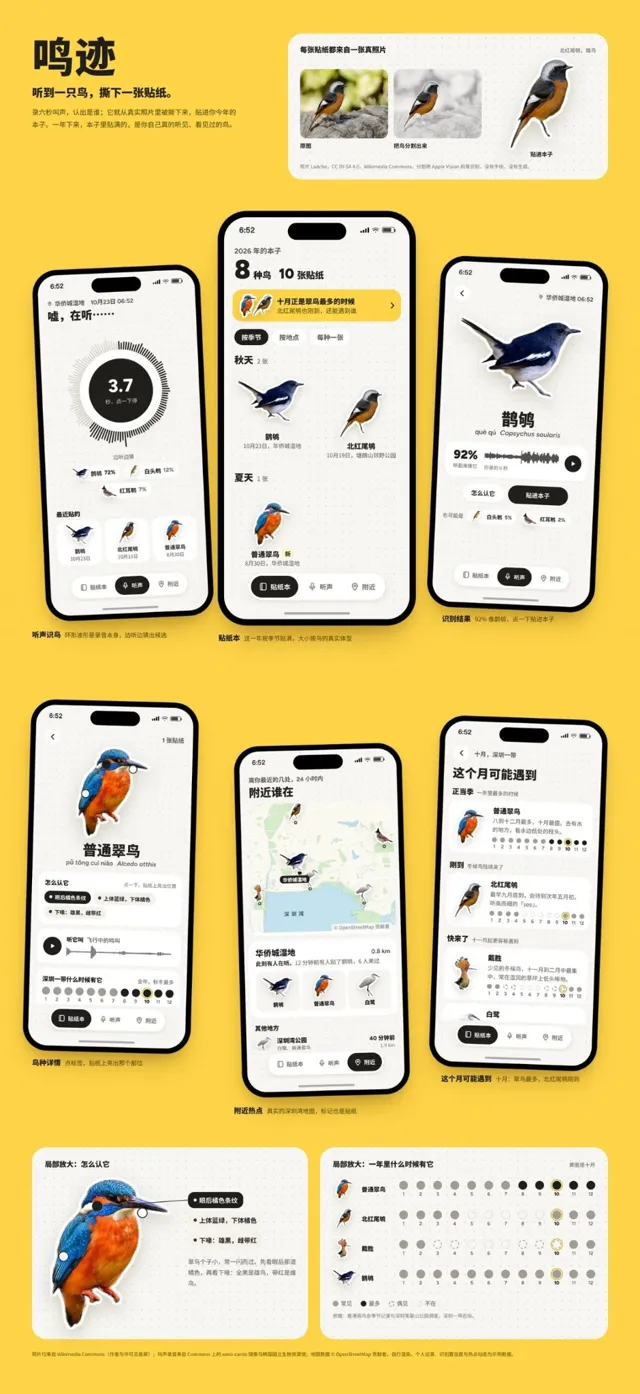
Notice two things in the creator’s “Mingji” birdwatching example above:
- Image treatment: Real bird photos become stickers that suit the journal’s visual style.
- Information structure: Bird details, nearby places and seasonal information support birdwatching tasks.
Differences from similar skills
- Emil UI skills collection: Also explores prototype alternatives, with a focus on interface motion, interaction details and code review. huashu-design applies a shared visual design workflow across websites, presentations and app prototypes, with direction selection before refinement.
- huashu-motion: Also starts with visual options, but focuses on promotional videos and lets you point at the video preview to request changes. Choose huashu-design for the visual design of a website, presentation or app prototype.
Install the skill and check the supporting files
- Make sure you have a coding tool that supports skills, such as Claude Code, Codex or Cursor. You also need Node.js 22.20 or later for the skills installer. The prototype files themselves do not require that version.
- Open a terminal in the project where you want to keep the design files and run:
npx skills@latest add alchaincyf/huashu-design- Select the coding tool you use when prompted. Check the destination shown by the installer: alongside
SKILL.md, it should containreferences/,assets/,scripts/anddemos/. Older installers could copy only the main file. If those directories are missing, reinstall with the latest command above. - Open your coding tool in the same project and explicitly ask it to use
huashu-design. The skill reads the relevant prototype, website or presentation module. You do not need to run every bundled script yourself.
The skill collects screenshots of reference designs into a reference board for the agent to inspect. Creating these boards and running some design checks require dependencies such as Playwright for Python and Pillow.
Missing dependencies cause the relevant scripts to provide installation guidance or skip their tasks. If you need those features, ask the agent to install the missing dependencies as instructed. Then rerun the affected steps. A skipped check is not a passed check.
Compare three designs before choosing a direction
The following requests are an editorial exercise, not the creator’s complete original prompt or a rerun of the published case. Start with the birdwatching prototype, then replace it with your own product.
Prepare the product purpose, intended users, four core screens, and any photos or brand assets you can use. You do not need to name a designer. “Used outdoors, one-handed recording, bird species and time easy to read” gives more useful direction than “premium and polished.”
Send this in your coding tool’s chat:
Use huashu-design to design a birdwatching journal app prototype.
It is for beginning birdwatchers who want to view species, log sightings and revisit records.
Include four main screens: journal, bird details, nearby places and seasonal calendar.
Use my bird photos first. If more are needed, find real photos with clear sources and licenses.
Explore six candidates, then select three distinct HTML prototype drafts with reference screenshots.
Vary layout, image treatment and information hierarchy, not just the color palette.
Use clearly labeled sample data. Do not connect a microphone, recognition API or live location service.
Give me drafts I can open and screenshots, then stop for my choice before refining a version.
Compare the drafts by asking two questions: Can you immediately find where to log a sighting? On a detail screen, which gets priority—the photo, identifying features or previous records? If the versions differ only in color, ask for different structures and image treatments before selecting one.
You should be able to open and inspect all three drafts. A list of style names and adjectives is not enough to make a useful choice.
Refine the selected clickable prototype
Once you have seen the drafts, specify what to keep and what to change. For example:
Choose the second direction. Keep the photo stickers, clear species headings and journal structure.
Show sightings chronologically in the journal. Open the matching details when I click a bird card.
Let me add a sample sighting from the detail screen and see it when I return to the journal.
Make nearby places and the seasonal calendar navigable too, still using labeled sample data.
Keep new records in the current page state. Refreshing can reset them. No database is needed.
Do not rebuild the other directions or replace the selected visual approach.
Deliver the HTML prototype, opening instructions and asset sources, and check the main click paths.
The skill saves design preferences and recent visual choices locally in ~/.huashu-design/ to help later projects avoid repeating the same look. It tells you when it records a preference. You can decline.
The design checks can flag broken images, small text and low contrast. You decide whether the design suits your needs. Check the click paths as follows:
- Open the prototype using the supplied instructions. A single HTML file can usually open directly in a browser. If the project has been split into files, use its local preview command. Open the prototype itself to check its behavior.
- Open a bird card. Add a sample sighting. Return to the journal. Check that the bird matches and the new record appears.
- Navigate to nearby places and the seasonal calendar. Check back navigation. Refresh the page. The sample records should reset as requested.
- Check headings, buttons and images at a phone-sized viewport, including anything near the device frame. Send specific problems back to the agent. Repeat the affected flow after a fix.
Make focused changes and adapt it to your product
To replace the yellow with a woodland palette, make a focused request:
Keep the selected version's screen structure, copy and click paths.
Change only the palette: take a green accent from the current bird photos and keep backgrounds readable.
Check buttons, selected states, labels and text contrast together.
Do not change fonts or rearrange the screens.
Show before-and-after screenshots and explain the scope of the changes.
For a plant-care product, reorganize the content too: bird details become plant profiles, sightings become watering and feeding records, and the seasonal calendar becomes care reminders. Replacing nouns while leaving a “recognize bird calls” entry would carry the wrong workflow into the new product.
Use this template for your own project:
Use huashu-design to design a [website / presentation / app prototype / infographic] for [product or topic].
Audience: [who will use it and in what setting].
Main tasks: [the two or three most important activities].
Available material: [content, brand guidelines, real images, reference links].
Keep unchanged: [brand requirements, functions, existing screens or data structure].
Show three comparable design drafts first. Complete the design after I choose.
Deliver: [file format and preview instructions].
Data and services: [what should use sample data and what needs a real integration].
The skill code uses the MIT license. Photos, recordings and fonts have their own licenses. Use the creator’s example to understand the method, and keep source records when you replace its assets with your own.