Turn English Patterns into Kids’ Follow-Along Videos
Make children’s English cartoons around one sentence pattern, with repeated questions, word cards and pauses to answer. Choose from five visual styles and five music options, including no music.
Works with Claude Code
Requirements
- macOS
- Node.js
- Python 3.12
- uv
- FFmpeg
- Playwright
- Codex
- Fish Audio API key
Overview
What you get
- Two-to-three-minute English episodes with repeated exchanges, word cards, repetition and answer pauses.
- Five visual styles with reusable character frames, plus five music options including none.
- Cached speech, beat-based scene timing, parallel rendering, an MP4 and a version without background music.
Tutorial
Build listening, repetition and answers around one pattern
To practise an English sentence pattern with a child, put it into cartoon exchanges that repeat with small variations. Kids English Video is designed for ages 3–6. Each two-to-three-minute episode includes questions, animal replies, word cards, model-and-repeat practice, group repetition and pauses for the child to answer, followed by a goodbye.
The demo above is “Do You Like Carrots?” Bobo and the animals discuss food, then the practice section asks “Do you like socks?” to prompt a playful negative answer. The hosted video is 1280×720, 30fps and 138.6 seconds with audio; the workflow targets landscape 1920×1080 output.
Choosing between animation approaches
Seven Styles for Narrated Explainer Videos starts with an existing Chinese voice recording and focuses on explaining content. This workflow designs repeated English exchanges, individual and group repetition, and pauses for answers. It suits a series of early English videos featuring the same characters.
This exercise uses “Can you jump?”: approve the action words and structure, audition one line, review one exchange, then extend the episode.
Install the skill and prepare speech and image tools
The official workflow is written for macOS, with a zsh image-generation script. Prepare Claude Code, Git, Node.js, Python, uv and FFmpeg. The project initializer uses uv to create a Python 3.12 virtual environment. New images use a locally signed-in Codex installation; speech needs a Fish Audio API key, and rendering uses Playwright and a browser.
- Run the installation commands from the official README:
git clone https://github.com/lwmxiaobei/xiaobei-skills.git
cp -R xiaobei-skills/kids-english-video ~/.claude/skills/kids-english-video- Open a new Claude Code conversation. Ask it to read the skill and check Codex sign-in, the image script, uv, FFmpeg and Playwright.
- Configure
FISH_AUDIO_API_KEYorFISH_API_KEYlocally for the episode project you will create later.
Choose a pattern, four action words and a style
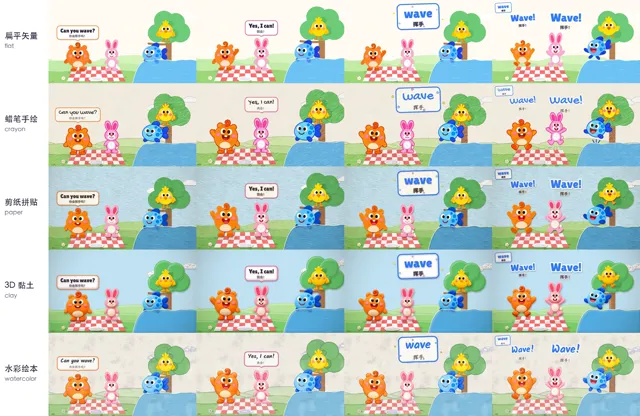
The gallery’s second image compares five styles by row: flat vector (flat), crayon (crayon), cut paper (paper), clay (clay) and watercolor (watercolor). Music choices are ukulele (ukulele), music box (musicbox), toy march (march), 8-bit (chiptune), or no music (none).
Each style includes four characters’ basic standing mouth poses, waves, laughs, cheers and a character sheet. Flat also includes example-episode actions. New movements such as jumping or swimming, and new objects, must be generated in the chosen style; changing the words alone is insufficient.
Send this Opuskill exercise request in Claude Code:
/kids-english-video Make an episode called Can You Jump?
Audience: children aged 3–6; target two to three minutes
Use Can you…? with jump, run, swim and fly
Choose crayon style and march music
Use English exchanges and repetition, with short Chinese glosses
Practise one action per round; include Yes, I can. and No, I can’t.
Keep pauses after questions for the child to answer, with one funny final question with an answer children can clearly infer from the picture
Show the script and character-action plan first and wait for approval; audition the voice before generating all narration
Check that abilities match the characters and pictures: a fish can demonstrate swimming, and a bird flying. Keep the joke understandable rather than making the action contradict the answer.
Create the project and preview one exchange
The assistant can create a project through the official entry point:
python3 ~/.claude/skills/kids-english-video/scripts/new_episode.py ~/videos/can-you-jump \
  --style crayon --music march --grammar canyoujump \
  --title "Can You Jump?" --title-zh "你会跳吗?"
This copies the template and characters, creates the environment and sets episode identifiers. The assistant still needs to adapt script.json and 代码工程/clips/canyoujump.js to the script. To run the unchanged official example first, use a separate empty directory with --example --style flat; a renamed template is not yet a new episode.
The template’s fishvoice.py imports api_key from a separate manim-explainer-video/scripts/fish_tts.py file outside this repository. If that skill is absent, follow the official README in your project copy: remove the external import, read the environment variables directly, and preserve the return format expected by the caller.
Send this request to the assistant:
Check fishvoice.py in this project
If the external fish_tts module is missing, follow the repository README and read FISH_AUDIO_API_KEY or FISH_API_KEY directly
Keep the api_key caller’s return format compatible, and do not print the key
Confirm that the script imports, then synthesize “Can you jump?” for me to audition; do not generate the whole episode yet
Continue once you can hear the sample without module or authentication errors. The source uses the Fish Audio model identifier s2.1-pro-free; access depends on your account.
- Review the script. Each exchange, card, model repetition, group repetition and pause should practise the same action word. The default tempo is 100 BPM, with three beats for answers in the practice questions.
- Ask the assistant to use the project’s character sheet to generate new actions, then cut and align the images to consistent heights and positions. Inspect them for missing poses, inconsistent colors and remaining magenta edges.
- After approving the voice sample, make only the jump round and one practice question. Review stills and a preview with sound before adding the other rounds.
Complete only the jump round and its practice question
Keep the question, character answer, word card, model repetition and group repetition
Leave three beats in the practice question; do not give the answer during that pause
Show key frames and a preview with sound; check that the action matches the word before extending the episode
Run build.py again after adding images so the scene specification registers the new assets.
Extend the episode and check the answer pauses
These are the official production steps inside the episode folder, for the assistant to run after script and visual approval:
.venv/bin/python tts.py                    # Generate speech or reuse cached takes
.venv/bin/python build.py                  # Arrange beats, voice and scene specifications
.venv/bin/python render_all.py --jobs 4    # Render picture segments
.venv/bin/python assemble.py               # Add music and effects, then mix
Before delivery, inspect a contact sheet covering the opening, each word card, practice and ending. Then play the film and check:
- Pronunciation, text, action and objects agree, especially in short phrases and exclamations.
- Questions leave genuine time to answer, with the model answer arriving after the pause.
- Bite, jump and other effects align with actions and do not obscure initial consonants.
The output is out/成片.mp4, with an additional out/成片_无背景音乐.mp4. With none, only the music-free out/成片.mp4 is produced. The loudness target is -16 LUFS. Keep the script, assets, voice cache and scene code for future changes.
Change a line or replace only the music
Voice takes are cached by voice, speed, text and occurrence number. Changing a line regenerates the affected takes, but their duration may change, requiring a rebuilt timeline and visual checks.
Change only one “No, I can’t.” to “Yes, I can.” and adjust that character’s action accordingly
Keep all other lines, the style and music
Regenerate the affected speech, rebuild the timeline and show this segment with sound
Check that the answer pause is intact before updating the whole episode
For music alone, change music in script.json and rerun assemble.py; characters and speech do not need regeneration. Volume changes also need only mixing. A style change requires replacement base frames, regenerated episode-specific images and picture rendering.
Only for custom-drawn scenes, ask the assistant to draw with g inside K.layer(c, kind, g => …) so crayon and other materials stay consistent.
For the next episode, supply:
Pattern: [Do you like…? / Where is…? / What color is it?]
Four words: [concrete words you can demonstrate visually]
Characters and setting: [who asks and answers, and which actions or objects explain the words]
Style and music: [supported choices]
Twist and funny question: [one sentence each, with clear answers]
Approve the script, audition the voice, preview one exchange and practice question, then extend the episode