Remove Stock AI Phrasing from Drafts and Replies
Edit articles and AI replies to remove stock phrasing, vary the rhythm and follow your own writing style. unslop offers assistant skills and a separate CLI for reviewing Markdown changes.
Works with Claude Code · Codex · Cursor · Windsurf · Cline · Gemini CLI
Overview
What you get
- Assistant skills for live replies, file rewrites, commit messages and review comments.
- Adjustable rewrite intensity and a voice-match mode guided by your writing samples.
- An optional Python CLI with local rule-based editing, diffs, backups and protected-region validation.
Tutorial
See what the rewrite changes
A cover letter, project introduction or AI reply can be complete yet full of pleasantries, vague praise and repetitive sentence patterns. unslop removes common AI writing habits, changes the rhythm and can follow a sample of your own writing.
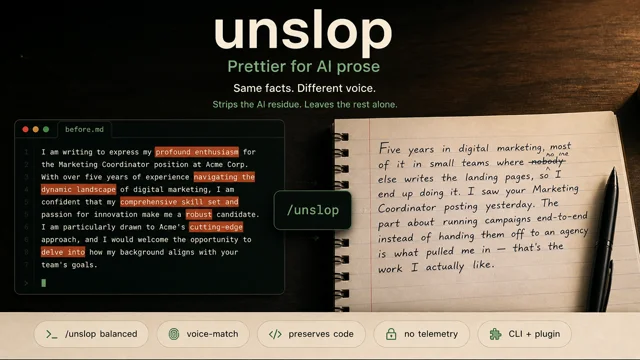
The official comparison uses an English cover letter. The original opens with “profound enthusiasm” and broad claims about ability; the rewrite moves to concrete work experience and reasons for applying. The useful lesson is to work with facts you already have, rather than copying the example’s biography. The repository’s vocabulary rules and examples focus on English, so start with a short English passage before moving to your own draft.
Choose between related skills
- Shorter AI Answers, Key Details Intact mainly compresses chat replies. This unslop also handles prose structure, rewrite intensity and personal voice; shorter is not its only goal.
- Give AI-Built Interfaces Their Own Character is a different project by heydamir that redesigns interfaces. This page covers Mohamed Abdallah’s writing project, with its own repository and installation commands.
Install and start with one paragraph
This walkthrough uses the Claude Code plugin. Use an existing Claude Code session; its local plugin hooks use Node.js. The optional command-line route later requires Python 3.10+, but you do not need to install that package for the plugin exercise.
- Enter these two lines in Claude Code chat. They are plugin commands, not shell commands for a terminal.
/plugin marketplace add MohamedAbdallah-14/unslop
/plugin install unslop- Restart Claude Code and enter
/unslopto enable the defaultbalancedmode. The upstream instructions describe a[unslop:BALANCED]statusline badge. Use/unslop-helpto see modes and related skills. - Send this exercise in the same conversation. The practice requests below were written by the Opuskill editors.
/unslop balanced
Rewrite this project update to remove pleasantries, vague praise and repeated setup.
Keep the date, numbers and link. Do not add achievements that are absent from the source.
Give the rewrite first, then explain the main changes in two sentences.

It's important to note that our team has made significant progress.
We shipped 3 fixes on 2026-11-03. The release notes are at https://example.com/releases.
Furthermore, we are deeply committed to delivering a robust and seamless experience.- Compare the result with the source. Are the three fixes, date and link still accurate? Does the remaining text say something concrete? If the final sentence adds no facts, removing it is more useful than swapping its adjectives.
The mode continues through the session. Send stop unslop to return to ordinary replies. The repository also provides Codex, Cursor, Windsurf, Cline and Gemini CLI integrations. Follow the official installation section for your host rather than treating Claude Code’s slash commands as another host’s installer.
Choose how much to change
| Mode | Intended change |
|---|---|
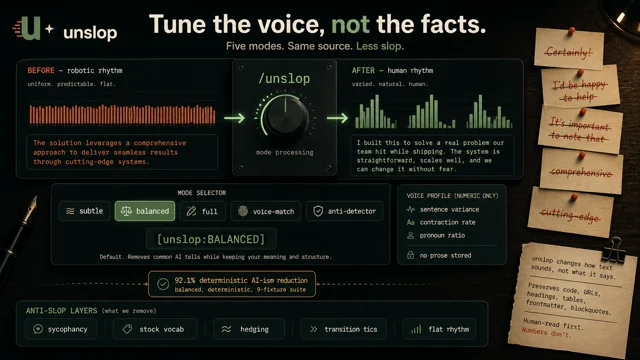
subtle | Mostly removes stock vocabulary while keeping roughly the same length and structure. |
balanced | The default: removes stock phrasing and adjusts rhythm and expression. |
full | A stronger rewrite that can reorganize sentences and paragraphs. |
voice-match | Adapts the writing to a sample you provide. |
Start with balanced. If it changes too much, switch to /unslop subtle and limit the request to one paragraph. If the structure itself is repetitive, try /unslop full. Intensity controls the scope of the rewrite; it is not a quality score.
Make one local change to the previous result:
/unslop subtle
Move only the release date to the start of the sentence.
Keep the fix count, link and all other wording.
Compare the versions side by side and check that changes stay within the requested passage. The chat skill instructs the assistant to preserve technical content, but you still need to check numbers and meaning. The deterministic CLI described below also validates protected text regions in code.
Use your own writing as a voice sample
voice-match uses the sample’s vocabulary, sentence lengths, punctuation and habits to guide a rewrite. A passage you wrote in the same genre gives clearer direction than “make it sound human.”
- Prepare a project introduction, email or article you wrote as the sample, plus a separate draft to edit.
- Send this request in Claude Code, replacing the brackets:
/unslop voice-match
Voice sample: [paste your own writing in a similar genre]
Draft to edit: [paste the draft]
Audience: [who will read it]
Must keep: [numbers, facts, names or exact sentences]
Follow the sample’s register and rhythm without moving its experiences, opinions or facts into the draft.
Rewrite only the first paragraph; wait for approval before editing the whole piece.- Compare the sample and rewrite. Does it use words you would use? Is the rhythm similar? Has it added an attitude you did not express? Point to a sentence when giving feedback: “This sounds promotional; describe what I actually did.”
- Approve that paragraph before expanding the edit, then check the facts across the whole piece.
The CLI also offers a numeric voice profile, storing statistics such as sentence lengths rather than the full sample text. This exercise uses a sample in the conversation and does not require a saved profile.
Inspect Markdown changes with the CLI
For file processing with reviewable diffs, use the optional standalone CLI. Deterministic mode applies fixed rules, mainly targeting English stock phrasing, without calling a model. It works differently from the assistant’s semantic rewrite.
Install and preview the diff
- Prepare Python 3.10+ and a working
pipx, then run this in your terminal:
pipx install unslop- Create
draft.mdin a practice directory. Add the English project update from above, a heading and a fenced code block so you can inspect the protection boundaries. - Run this from that directory:
# Show changes without writing the file
unslop --deterministic --diff draft.md
Check that the diff affects only the prose you intend to edit. Code blocks, inline code, links, headings, tables, blockquotes and YAML frontmatter are protected in deterministic mode. It validates those regions and does not write the file if validation fails.
Apply the edit and inspect the report
# Update draft.md, keeping an original backup and a rule-change report
unslop --deterministic --report audit.json draft.md
Inspect draft.md, the backup draft.original.md and audit.json. The report records which rules fired and the text before and after each change, helping you trace why a sentence changed.
For model-backed semantic rewriting, follow the official instructions to install unslop[llm] and configure ANTHROPIC_API_KEY, or use an installed Claude CLI. The model route sends the prose to the configured service. Its preservation behavior is instructed through a prompt rather than enforced by the deterministic mode’s byte checks.
Apply the method to your own draft
Choose a short piece and send this template to the assistant with unslop active:
Draft: [paste the text or give a file path in the current project]
Purpose and audience: [project introduction, email, cover letter, etc.; who will read it]
Editing goal: [remove pleasantries, cut repetition, adjust tone, etc.]
Voice reference: [optional: your own writing in a similar genre]
Must keep: [facts, numbers, code, links, headings or exact sentences]
Start with balanced mode on one paragraph and show before and after.
Wait for approval before editing the whole piece. Do not add information absent from the source.
Turn “more natural” into changes you can point to: remove empty openings, replace praise with concrete facts and let sentence length follow the content. You can then judge whether the result suits its readers, rather than merely counting how many stock words disappeared.